总算有机会用 AI 做到 Vibe Coding 的感觉了,同时用 Python 写能在本地运行的脚本原来是这么有成就感的。
🙈 404 Page Not Found #
这是延续我在 Why I Move from Ghost to Hugo 的文章,因为 Ghost to Hugo 转档后有不少 __Ghost_URL__ 的链接。这些链接都是内部链接应该是方便 Ghost 用户更换域名不会造成一些混乱。
然而在我的场景中,这「善意」在我这里成为了负累。因为这网站的读者点击这些链接就会回报 404 Page Not Found 的错误。同时当时为了让网站完成迁移到 Hugo 的优先级时把它放在较靠后的位置。
现在我终于有机会正视这个问题了,一开始我打算一篇一篇的打开将 「Ghost_URL」手动替换为 「https://iam.mingshun.me/post」毕竟我大部分的文章的位置都是在 「Content/Posts」中。 手动对于有 100+ 篇来说有些费时,同时我也想到我的电脑本地已经部署了 Python 何不尝试用 Python 完成一些自动化的流程?
🫵 Python! I Chose You! #
由于 Python 经验尚浅, 当初我根本不知道 Python 有 OS 库,所以我直接问 Gemini,Gemini 给予协助同时也会讲解步骤。我还发现这个 Code 的质量相当不错,如果碰到错误就直接 return 不浪费多余的算力。
OPEN() #
以及关于 open() 的用途以及大概怎么用。8 Ways to Use the Python open() Function
第一版本的 Python:
import os

def replace_content_in_md(file_path, old_text, new_text):
    """
    Reads a file, replaces text, and writes the changes back.
    """
    if not os.path.exists(file_path):
        print(f"Error: The file '{file_path}' was not found.")
        return

    # 1. Read the file content
    try:
        with open(file_path, 'r', encoding='utf-8') as file:
            file_content = file.read()
    except Exception as e:
        print(f"Error reading file: {e}")
        return

    # 2. Replace the content
    modified_content = file_content.replace(old_text, new_text)

    # Check if any replacement was actually made (optional)
    if modified_content == file_content:
        print(f"No instances of '{old_text}' were found to replace in '{file_path}'.")
        return

    # 3. Write the modified content back
    try:
        with open(file_path, 'w', encoding='utf-8') as file:
            file.write(modified_content)
        print(f"Successfully replaced all instances of '{old_text}' with '{new_text}' in '{file_path}'.")
    except Exception as e:
        print(f"Error writing to file: {e}")

# --- Usage Example ---
md_file = 'README.md'
text_to_find = 'The old project title'
replacement_text = '**The New & Improved Project Title**'

replace_content_in_md(md_file, text_to_find, replacement_text)🚴♀️进一步优化 #
os.listdir()
只不过这个就只是针对单一文件,如果手动一个个添加文件可能也是挺费时间的,于是在问 Gemini 有没有办法将文件夹里的档案给汇出的方法,AI 给出了 os.listdir() ,这汇出是以list 的方式汇出的。
for loop
既然已经知道原理了,我立即想到我可以以 「for loop」来完成这项创举。
🚴♀️Debug 以及观察 #
你也可以像我这样,加入 time 计算执行时间,我相信是因为环境配置的关系,Python 文件需要在同一个根目录,但是衍生出另一个 bug, python 文件中的 ‘Ghost_URL’ 也是会被替换
这是可以在 def 里边加上个 if 来避免的。
可是没想到我的知识储备还是不够,一开始打算如果想用 wildcard 的方式来略过如果文件的后缀是 .py ,但是如果 if file == "*.py" 是永远找不到的,因为文件夹中根本没有一份文件是 「*.py」,同样地查询后原来只要 file.endswith(".py") 就会找到后缀是 .py 的文件了,这样写就会略过 .py 的档案。
第二版本的 Python:
import os

import time


def replace_content_in_md(file_path, old_text, new_text):

    """

    Reads a file, replaces text, and writes the changes back.

    """

    if not os.path.exists(file_path):

        print(f"Error: The file '{file_path}' was not found.")

        return


    # 1. Read the file content

    try:

        with open(file_path, 'r', encoding='utf-8') as file:

            file_content = file.read()

    except Exception as e:

        print(f"Error reading file: {e}")

        return


    # 2. Replace the content

    modified_content = file_content.replace(old_text, new_text)


    # Check if any replacement was actually made (optional)

    if modified_content == file_content:

        print(f"No instances of '{old_text}' were found to replace in '{file_path}'.")

        return


    # 3. Write the modified content back

    try:

        with open(file_path, 'w', encoding='utf-8') as file:

            file.write(modified_content)

        print(f"Successfully replaced all instances of '{old_text}' with '{new_text}' in '{file_path}'.")

    except Exception as e:

        print(f"Error writing to file: {e}")


# --- Usage Example ---

text_to_find = '(__GHOST_URL__/'

replacement_text = '(https://iam.mingshun.me/posts/'


# This is to list directory in list [], I should be able to do it change it with for loop

destination_directory = os.listdir("C:\\Users\\xx\\xx\\xx\\xx") # [a.md,b.md,c.md]

print(destination_directory) # 用来确定 destination_directory 的结果


start_time = time.time() #开始时间


for file in destination_directory:

    if file.endswith(".py"): #后缀 .py 就会略过

        continue

    else:

        replace_content_in_md(file, text_to_find, replacement_text)

end_time = time.time() #结束时间


totaltime = end_time-start_time #耗时


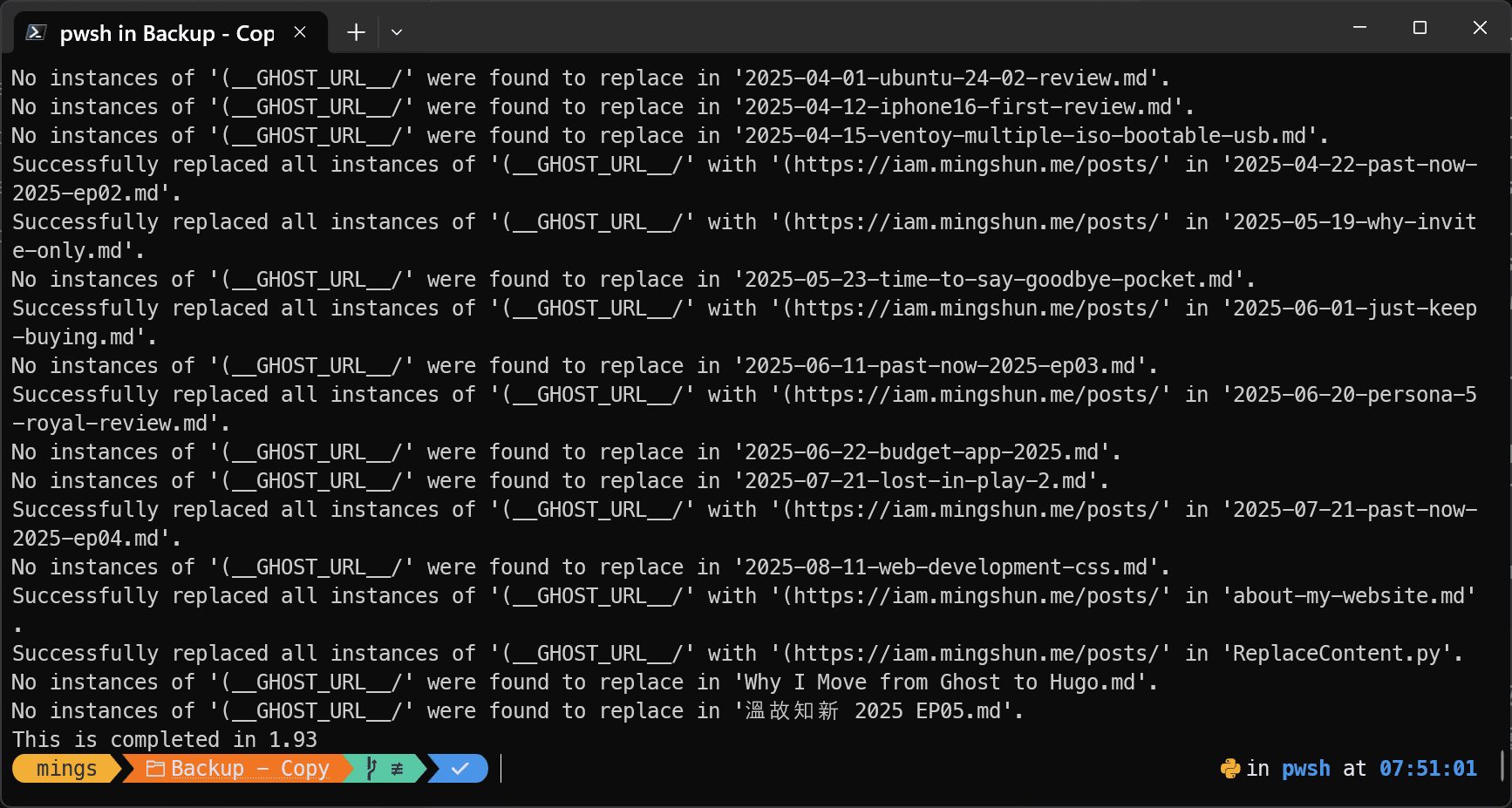
print(f"This is completed in {round(totaltime,2)}")
终于在现实中实践 Python 自动化流程了 #
学习了 Python 终于有机会实践了,虽然大部分时间都是 Vibe Coding, for loop 打包成一个 def,就结果来说,我还算满意,花费了大约 2秒中的时间替换完成,如果手动的话可能需要全力 30 分钟到一个小时来完成。真的要执行起来节省了将近 99% 的时间。
大约节省了 99% 的执行时间
即便一开始花费时间学习编程,但要意识到的一点是不论学习得到的知识储备或是代码本身是「可拓展」的。 第一,学习编程会有这方面的技能能够应用在不同场景;第二,代码可以用来执行不同的场景,甚至更多的的文档,将来有需要的话我可以重复使用这串代码。
这就是为什么即便我认为这只是一次性的迁移,记录下,方便以后如果网站更换域名又或是用作其他用途的不时之需,同时也算是学习 Python 以来第一个真正解决现实中会遇到的问题。
我也明白为什么 GPT 横空出世会如此的会对如此多的方面造成冲击,比起 Google 找网站到论坛发文,都没有直接问 AI 来得快速几乎是 24 小时待命的老师。当然我还是很享受学习过程带来的成就感,用 AI 最主要还是减少相当多的 「撞墙期」。